Tasks and milestones
The Milestones and tasks section brings project work and checkpoints together. A task describes work to carry out; a milestone marks a checkpoint or result to reach. Use the list to compare what is due and who is assigned.
Find tasks
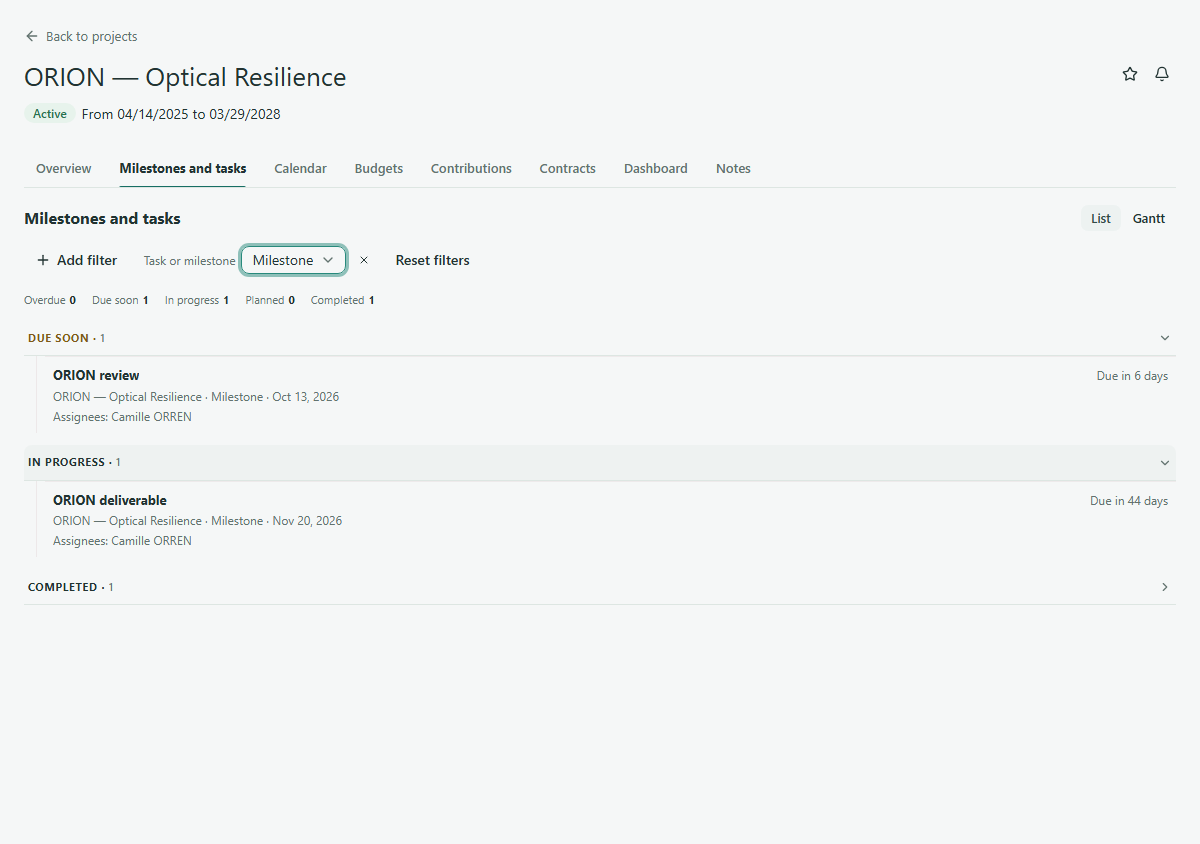
- Open ORION — Optical Resilience and select Milestones and tasks.
- Stay in List view and use the Task or milestone filter to show tasks when you need to narrow the list.
- Read each task's name, due date or due message, state group and assignees when present. Some tasks also show progress.
The list groups items by state, such as Overdue, Due soon, In progress, Planned and Completed. Expand a group to see its items. Open an item for its available details. A missing due date is shown as such rather than implying that the item is finished.

Find milestones
Use the same Milestones and tasks section. Set Task or milestone to milestones if you want only checkpoints. Read the milestone name, due information, state group and assignees when shown. The list uses the same navigation for tasks and milestones; the item type tells you which you are reading.
The Gantt control offers a timeline view, but this page covers reading the list. Edit and add controls depend on your permissions.
Continue
View the project calendar or return to the project overview.